Sunday, 12 August 2018

How to Fix iTunes Backup Corrupt Issue


How to Fix iTunes Backup Corrupt Issue 2019

Fix iTunes Backup Corrupt Issue

2. Delete the Corrupt iTunes Backup and Backup Again Via iTunes
2.1 Deleting the Corrupt iTunes Backup

You can delete your corrupted or incompatible backup via iTunes interface. The process to do this is straightforward.

Follow these steps:

Step 1: Launch iTunes on your Windows PC or Mac.

Step 2: Navigate to Edit > Preferences if you are on Windows PC. If you are on Mac, then use the upper left corner of your Mac to access these options.

Step 3: Once in the Preferences section, navigate to Select Devices and then find your iDevice from the provided list of backups.

Step 4: After finding and selecting your device, select the corrupt or incompatible backup and then click the Delete Backup button. Confirm your action by clicking the Delete button when it is prompted.


2.2 Backing Up iPhone Again

Backing up your iPhone via iTunes is just a simple as deleting a backup. You will need to connect your iPhone to computer first of course.

Follow these steps:

Step 1: Launch iTunes and connect your iPhone to your computer via lightning cable.

Step 2: Select your connected iPhone’s name from iTunes. It will be shown on the top right corner of the interface.

Step 3: Now click ‘This computer’ option and then click on ‘Back Up Now’ option available in the Backups column. The backup process will begin.

You may like:

free photo recovery software

If you lost videos from iOS Camerall Roll which are nowhere to download again, you can use Gihosoft iPhone Data Recovery to get back deleted videos from iOS device including iPhone, iPad and iPod Touch.Please check jihosoft iphone data recovery

How to Play iMessage Games in iOS 11.3/11.2/11


How to Play iMessage Games in iOS 11.3/11.2/11
Part 1. Install iMessages games

Here are the steps to follow:


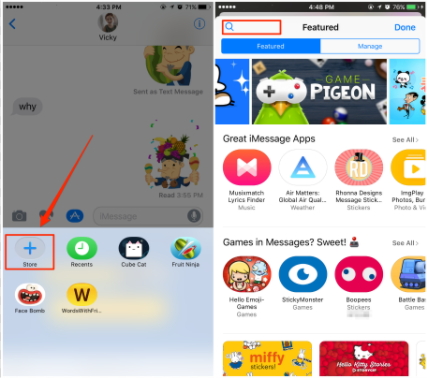
Enter the iMessages app store.


When you look for target games, you will find the text ‘only for iMessages’ written right below the icon of the app.


You need to click on the ‘Get’ icon and the app will be downloaded.


When downloaded, you will find the app installed in the Store icon in your iMessages conversation box.

Part 2. Play games on iMessages


First of all decide who you want to play the game with and open their iMessage dialog box.


Now tap on the app store icon in the dialog box and then tap the four gray dots which will show the apps which are present on your device.


Now choose the game you want to play.


When you have selected the game, a game invitation will be made and you can send it to your friend who in turn can download it on their device.


You both can now start playing the game.


Part 3. Top 10 iMessage Games in iOS 11.3

Here are 10 of the best games you can possibly enjoy when playing in iMessages.


Quiktionary: Guess a four lettered word based on clues.
Must read:Gihosoft Free iPhone Data Recovery:https://www.gihosoft.com/iphone-data-recovery-free.html

Words with friends: Simply make a word with the letters and score higher.


Mr. Putt: This is for all golf lovers out there. Quite realistic and very very addictive.


Msg me word guess: Very much like hangman, it is addicting to pay.


Four in a row: A classic board game, this will have your hooked for long.


Game pigeon: Very much like solitaire and minesweeper, these are great options for 2 player games.


Cobi hoops: You need to score as many baskets as you can in a 30 second window.


Wordle: Guess the word: More like a jumble, you need to guess the word from the messed up letters.


Memorado: Fun game to improve concentration and memory.


Fast thumbs: Show off your speed typing skills.
Part 4. How to uninstall iMessages games

If you are done playing the game and want to know how to uninstall it, here are the steps to do so.


You need to head to the iMessages keyboard app pane.


Now click and hold the game icon until you find the X icon.


Click on the X icon to uninstall the game.

You also have an alternate way wherein you can go to the game screen and delete the app from the home screen by pressing and holding it until it begins to wiggle and the X icon appears.
Photo recovery free photo recovery 100% free to restore deleted/formatted/lost pictures in just three steps Photo recovery
Gihosoft Free Android Data Recovery can help you easily recover lost data such as photos, videos, contacts, text messages, WhatsApp & Viber chats from Google Pixel/XL or other Android phones effortlessly.
Any app suggestions or topic recommendations are appreciated in the comments down below.


If you lost videos from iOS Camerall Roll which are nowhere to download again, you can use Gihosoft iPhone Data Recovery to get back deleted videos from iOS device including iPhone, iPad and iPod Touch.

Gihosoft Free Android Data Recovery can help you easily recover lost data such as photos, videos, contacts, text messages, WhatsApp & Viber chats from Google Pixel/XL or other Android phones effortlessly.

Jihosoft Android Data Recovery: the best Android Data Recovery software for Windows and Mac to recover deleted contacts, messages, photos, videos, WhatsApp and etc from Android devices.

Any app suggestions or topic recommendations are appreciated in the comments down below.


So, with these details, it should now be fairly easy for you to enjoy the best games on the messaging app. We are sure that you will have a great time playing these with your friends and even try defeating them too.

Sunday, 10 June 2018

Fix WhatsApp Update Stuck on iPhone/iPad

Fix WhatsApp Update Stuck on iPhone/iPad

Restart Your iPhone/iPad
Restart iPhone X


Hold Side button and volume button.


Drag the slider and turn off the phone.


Press the side button to start the phone.


Restart iPhone 8 (or older)/iPad


Hold the side or top button.


Drag the slider and turn off the device.


Press top or side button.


2Update WhatsApp in Apple App Store


Go to App Store.


Tap on the Updates option (at the bottom).


Locate WhatsApp.


Tap Update.


3Check Your iPhone Storage


Go to Settings and select General.


Select Storage & iCloud Usage.


Select Manage Storage.


Select the malfunctioning app and delete it.


4Close Other Running Apps


Double press the home button.


Remove the apps (all of them) runs in the background.


5Turn Airplane Mode on and off


Go to settings.


Tap on the toggle button closer to “Airplane Mode”.


Repeat the same to turn off the Airplane Mode.


6Toggle to Turn Cellular Data on


Go to settings.


Tap on Cellular button and then tap on the toggle switch next to Cellular Data option.


7Turn Wi-Fi off and on


Go to settings.


Tap Wi-Fi.


Turn it grey or green simply by tapping on it.


8Try Another Wi-Fi Hotspot


Go to settings and Tap on Wi-Fi.


Turn Wi-Fi on.


Select a different Wi-Fi Hotspot name and get connected.


9Reset Network Settings Must read:Gihosoft Free iPhone Data Recovery:https://www.gihosoft.com/iphone-data-recovery-free.html


Go to Settings and tap General.


Tap on Reset and go to Reset Network settings.


Enter the password (if applicable).


Confirm reset network settings.


2: Back up iPhone/iPad before Fixing WhatsApp Update Stuck


When you experience some unexpected things about WhatsApp, the first thing you should do is to get a backup before fixing it.


Why Backup Your iPhone/iPad before Fixing?


Backing up WhatsApp Data via iTunes


Backing up WhatsApp Data via iCloud


Backing up WhatsApp Data via iPhone Data Exporter
Why Backup Your iPhone/iPad before Fixing?


The reason is that WhatsApp tends to lose some of the files during the fixing process. For instance, WhatsApp messages, contacts, photos, notes, videos etc. can get erased during this process. We know some of these files are exceptionally important to you. Therefore, we strongly recommend you to back up your iOS device in advance.
Backing up WhatsApp Data via iTunes


One of the easiest ways to create a backup of your WhatsApp data is using iTunes. Let’s take a look at the pros and cons of iTunes.


Pros of iTunes Backup


You don’t need to use any third-party software tool


Even the large files can be backed up using iTunes without paying
Cons of iTunes Backup


You cannot view the data inside this kind of backup


You must have access to a computer and connect the iOS device to it to backup it
Backing up WhatsApp Data via iCloud


Another way to backup your WhatsApp-related data is using iCloud. Here’s a list of pros and cons associated with iCloud.


Pros of iCloud Backup


iCloud can back up your device automatically


It features wireless backup process


You are allowed to backup the data without a computer
Cons of iCloud Backup


iCloud requires an internet connection


Not all your device data will be backed up


You cannot view all the content in your iCloud backup


You get a limited free space (up to 5GB)


Do you like this story?


Sponsor Ads:

Image result for gihosoft iphone
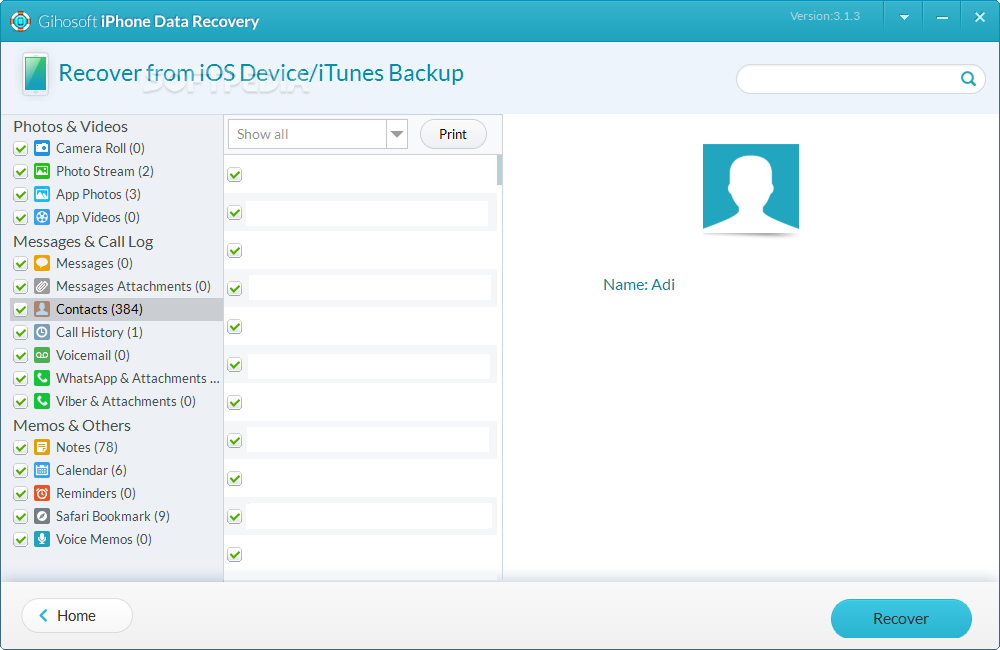
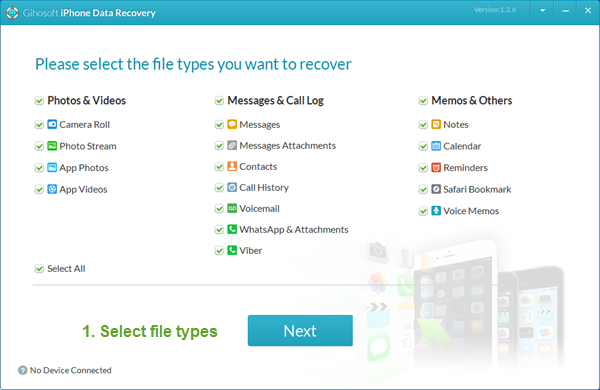
Gihosoft iPhone Data Recovery is a professional iPhone Data Recovery software to get back all your lost text message, photo, video, call history, note, contact and more from iPhone/iPad/iPod Touch. It offers a full solution to recover your lost data in different tough situations. Besides recovering data directly from iPhone, iPad and iPod touch, it also allows you to recover data from iCloud and iTunes backup files.

Tuesday, 29 August 2017

Download iOS 11.0 Beta 8 for Free (IPSW Direct Download Links & Over the Air Profile) 2017

Today Apple has released beta 8 of iOS 11 to developers. This new version brings lots of new features, such as a redesigned control centre, smarter Siri, lots of productivity improvements for the iPad, and much more. Anyone can download and install it right now by either downloading the IPSW file, or the OTA profile below.
iPhone Download Links: 
iPad Download Links: 
iPod touch Download Links:
Over The Air Profile:
For instructions on how to install iOS 11 beta on your iPhone, iPod touch or iPad without having a paid developer account or UDID activation click here.
Check out the iOS 11 section of the website for more information about iOS 11.
If you lost videos from iOS Camerall Roll which are nowhere to download again, you can use Gihosoft iPhone Data Recovery to get back deleted videos from iOS device including iPhone, iPad and iPod Touch.

Jihosoft iPhone Backup Extractor Extract and recover all types of data from iPhone backup files, such as camera roll photos, videos, SMS, contacts, reminders, WhatsApp, and etc.
Image result for gihosoft iphone

Wednesday, 2 August 2017

How the carrier unlock an iPhone?

How the carrier unlock an iPhone?

It depends on what carrier you have, and what the status of your device is. I am going to assume you are in the United States. Here's what each major carrier does in terms of unlocking (in general, these policies are not just for iPhones, but all smartphones):


Verizon Wireless: If your iPhone is an LTE iPhone (iPhone 5 and later), it is already automatically unlocked by Verizon. You don't have to do anything else to use your iPhone on another carrier, domestic or international. If it is not an LTE iPhone from Verizon, you would have to contact them to request an unlock. If your iPhone has a bad ESN, lost/stolen, or is under bad status, you may not be able to use it on another carrier.Must Read:Why is my iPad so slow?

AT&T: You can unlock your iPhone from AT&T by contacting them or using this website: AT&T Wireless Consumer Device Unlock Request, and you will get an email from them once your iPhone has been unlocked (in a few days). Your device must be out of contract and in good status (no bad IMEI, lost/stolen, etc).Must Read:iPhone white screen

T-Mobile: You will need to call T-Mobile to unlock your iPhone. They will unlock it given it is not under contract, financing, and does not have a bad IMEI/lost/stolen.

Sprint: You will also need to call Sprint to unlock your iPhone. You can also do it, on their website, through Live Chat. Again, your device must not have a bad IMEI/be lost or stolen, financed, under contract, etc.


You may like:


best youtube downloader

If you lost videos from iOS Camerall Roll which are nowhere to download again, you can use Gihosoft iPhone Data Recovery to get back deleted videos from iOS device including iPhone, iPad and iPod Touch.Please check jihosoft iphone data recovery
Truth About Free Wondershare SafeEraser Registration Code Online


When you decide to buy a Wondershare SafeEraser registration code you can choose between 4 different licenses. Must read:Gihosoft Free iPhone Data Recovery:https://www.gihosoft.com/iphone-data-recovery-free.html


[$39.95] Basic License. This license can be used on 1 device and lasts for a lifetime.


[$49.95] Family License. This license can be used for 1-5 devices and lasts for a lifetime.


[$29.95] One Year License. This license is authorized for 1 device and only lasts for 1 year.


[Custom Price] Customized Business License. If you are using Wondershare SafeEraser for your business, then you can receive a customized package depending on your needs.


Truth


You may find some Wondershare SafeEraser license codes or keygen online, but whenever you try to register the product with these registration code, you'll see the message "Invalid licensed e-mail or registration code!". This is because the serial keys have been used too many times which have already over the limited times.Jihosoft iPhone Backup Extractor Extract and recover all types of data from iPhone backup files, such as camera roll photos, videos, SMS, contacts, reminders, WhatsApp, and etc.


Gihosoft Free iPhone Data Recovery is a professional iPhone Data Recovery software to get back all your lost text message, photo, video, call history, note, contact and more from iPhone/iPad/iPod Touch.

Saturday, 29 July 2017

How you can clear the Twitter cache on your iPhone

How you can clear the Twitter cache on your iPhone


Twitter is one of the most popular social networks in the world. Basically, Twitter allows you to post short tweets, share images and videos, and even broadcast live videos. The social network service has changed a lot since it made its debut many years ago.


You may like:
best youtube downloader

If you lost videos from iOS Camerall Roll which are nowhere to download again, you can use Gihosoft iPhone Data Recovery to get back deleted videos from iOS device including iPhone, iPad and iPod Touch.Please check jihosoft iphone data recovery


If you are one of those who frequently spend hours every day scrolling to your feed viewing memes in Twitter for iPhone, you may have noticed that Twitter automatically saves everything you have previously viewed. While caching may come in handy when you are on a limited data plan, it also puts a lot of pressure on your iPhone’s storage space. Therefore, clearing the app’s cache serves as the best option to get more storage space.

With that in mind, in this step-by-step guide, we will walk you through the steps to clear Twitter cache on your iPhone to save some storage space.Must read:Gihosoft Free iPhone Data Recovery:https://www.gihosoft.com/iphone-data-recovery-free.html
Steps to clear Twitter cache on your iPhone

Step one: First off, you need to launch the Twitter app from your home screen. Once you are done, you now need to tap on theMe tab located at the bottom-right corner of the app

Step two: Next up, hit the Settings icon and choose Settings. Once you are in, navigate to the Data Usage option and tap on it

Step three: From here, you will find Media storage and Web storage options. You can easily view how much storage space they are taking up on your iPhone

Step four: Tap on the Media storage option and hit the Clear media storage. This will remove the cached photos, GIFs and Vine data


Step five: Once you are done, head back to the Data Usage page and select the Web storage option. When you are in, you simply need to choose “Clear all web storage.”


That’s it! You have just cleared the Twitter data cached on your iPhone.If you lost videos from iOS Camerall Roll which are nowhere to download again, you can use Gihosoft iPhone Data Recovery to get back deleted videos from iOS device including iPhone, iPad and iPod Touch.


Jihosoft iPhone Backup Extractor Extract and recover all types of data from iPhone backup files, such as camera roll photos, videos, SMS, contacts, reminders, WhatsApp, and etc.
Gihosoft Android data recovery Free is a super awesome software specialized in Android file recovery.

How to Back up iPhone iOS 12 to Laptop Using iTunes

How to Back up iPhone iOS 12 to Laptop Using iTunes iTunes is the default program that was made by Apple to be used for backing up all files...